
API & Tool Interception
One of the central workflows in the Caber User Console is discovering outbound agent APIs, Model Context Protocol (MCP) servers, vector stores, and object stores from live wire traffic and configuring inline interception and payload extraction rules without rewriting application code.
This guide covers the complete discovery to interception workflow across Discovered Tools & APIs (/admin/discovery), API Mappings Studio (/admin/config/api-mappings), and SDK Service Bindings (/admin/config/sdk-deployments).
End to End Interception Workflow
- Discover Resources (
/admin/discovery): The Caber SDK and wire proxy passively observe outbound HTTP requests,MCPJSON RPC calls, vector search queries, and storage connections, grouping them by resource category and host. - Inspect Endpoints & Observed Schemas: Expanding any discovered host reveals individual method and path records along with automatically fingerprinted JSONPath payload structures (
layouts). - Confirm Layout or Launch Inline Mapping Wizard:
- If the wire observer has fingerprinted a JSON payload layout (
layoutLatest), clickingInterceptopens the inline Confirm Intercept Layout (LayoutConfirmPanel) to bind semantic roles (ITEMS,TEXT,ID,SCORE,INPUT,OUTPUT,ERROR) directly to observed JSONPaths. - For any discovered endpoint, expanding the row and clicking
+ Add API Mappingopens the inline mapping wizard to register the host inApiMapwith an enforcement mode (observeorenforce).
- If the wire observer has fingerprinted a JSON payload layout (
- Configure Route Rules & Semantic Extraction (
/admin/config/api-mappings): In the API Mappings configuration studio, operators refine per host upstream URLs, payload formats (openai_chat,mcp_jsonrpc,qdrant_search,rest_json), and path specificroute_rules. - Bind Mappings to SDK Services (
/admin/config/sdk-deployments): Operators attach configuredApiMapentries to logical SDK services so connected SDK instances enforce those interception rules in real time.
Discovered Tools & APIs (/admin/discovery)
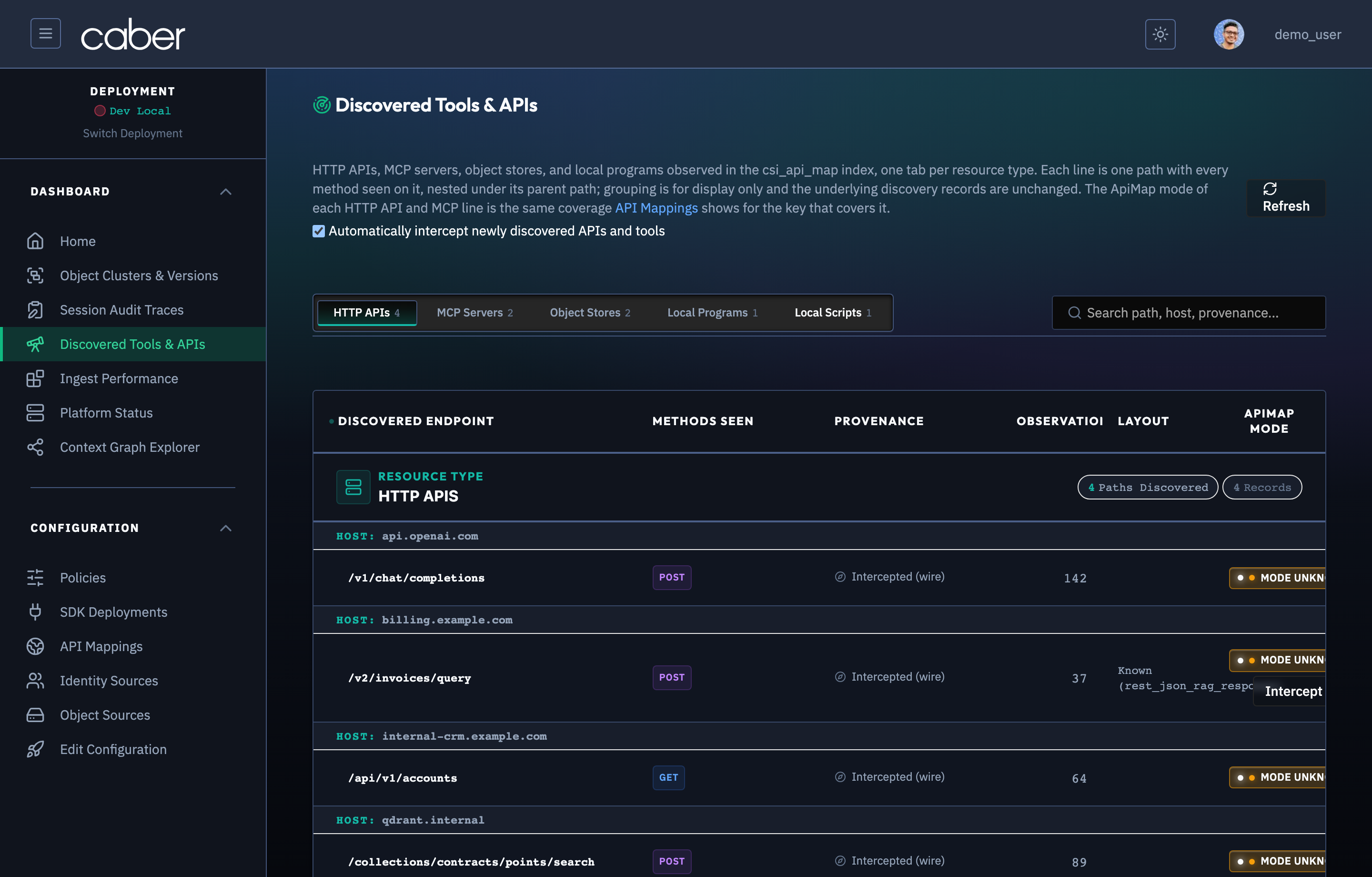
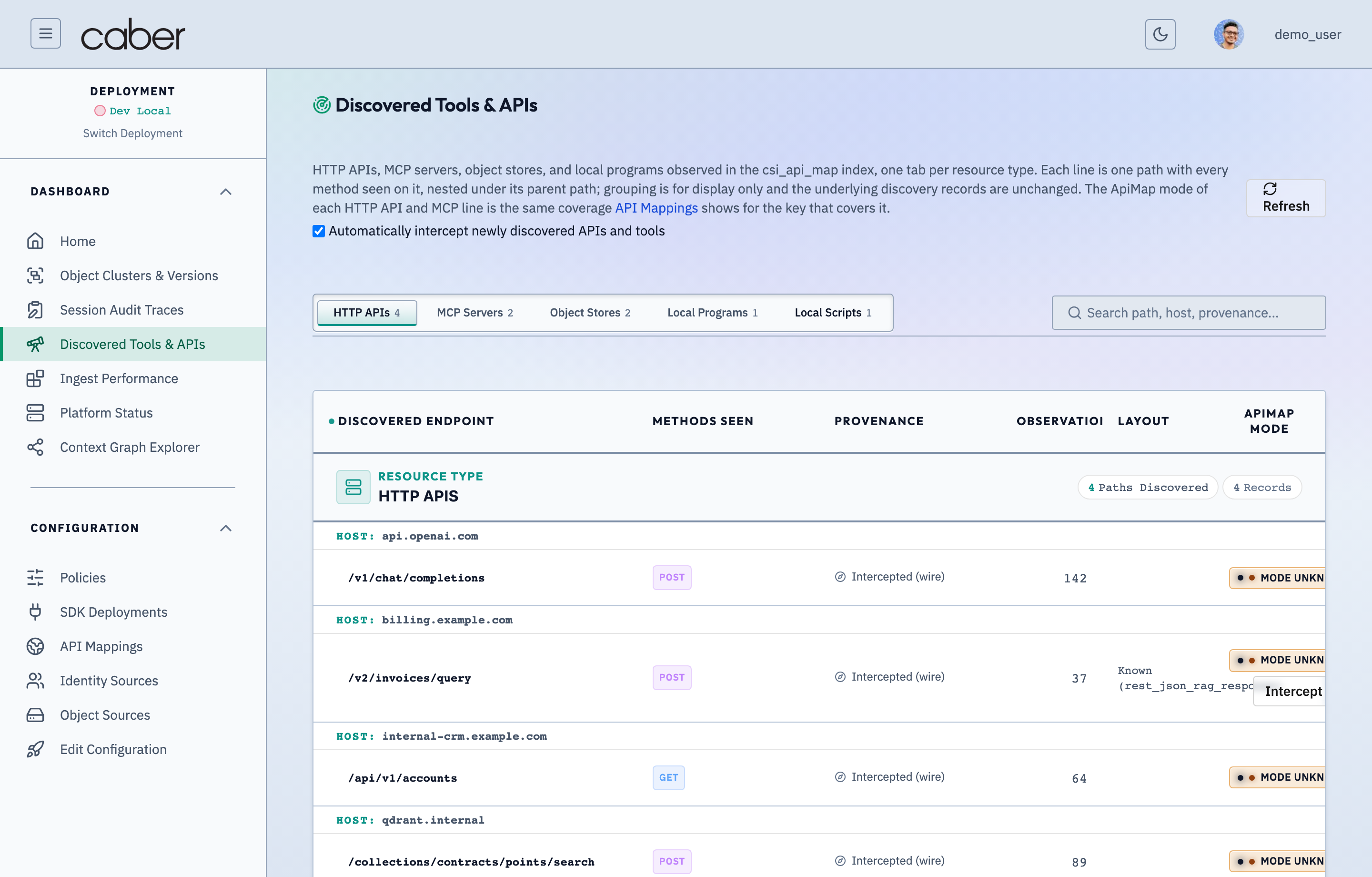
Navigating to Discovered Tools & APIs (/admin/discovery) opens the resource discovery catalog (ConfigApiDiscovery), organized into five category tabs with live resource counts:
- HTTP APIs: Outbound REST and LLM provider endpoints (
api.openai.com,billing.example.com,internal-crm.example.com). - MCP Servers: Model Context Protocol tool servers (
mcp-server-back-door). - Object Stores: S3, MinIO, and document store buckets (
minio-contracts,s3-sec-filings). - Databases: SQL and vector database endpoints (
qdrant.example.com,postgres-erp.example.com). - Scripts: Local command or script executions (
agent-worker-01/EXEC/srv/agents/sync_embeddings.py).
/admin/discoveryAPI & Tool Discovery — HTTP/REST & LLM Endpoints InventoryAssertion Verified: Proves that Caber passively discovers outbound HTTP, REST, and LLM API endpoints invoked by instrumented services, automatically classifies their payload layouts, and tracks whether each endpoint is governed by an active ApiMap contract.
- Category Tabs (
HTTP APIs,MCP Servers,Object Stores,Databases,Scripts): Switches the table to the selected resource class and displays the count of distinct endpoints in each class. - Search Filter: Filters discovered hosts and paths by substring (
openai,billing,/v1/chat,mcp). - Mapping Status Filter (
All,Mapped,Unmapped): Isolates unmapped shadow endpoints that do not yet have anApiMapentry (Unmapped) from governed endpoints (Mapped). - Host Grouping Tree: Groups endpoints under collapsible host headers (
api.openai.com (2),billing.example.com (1)), showing aggregate call counts, discovery channel badges (wire,passive), and last observed timestamps.
Expanding Discovered Endpoints & Inline Mapping Wizard
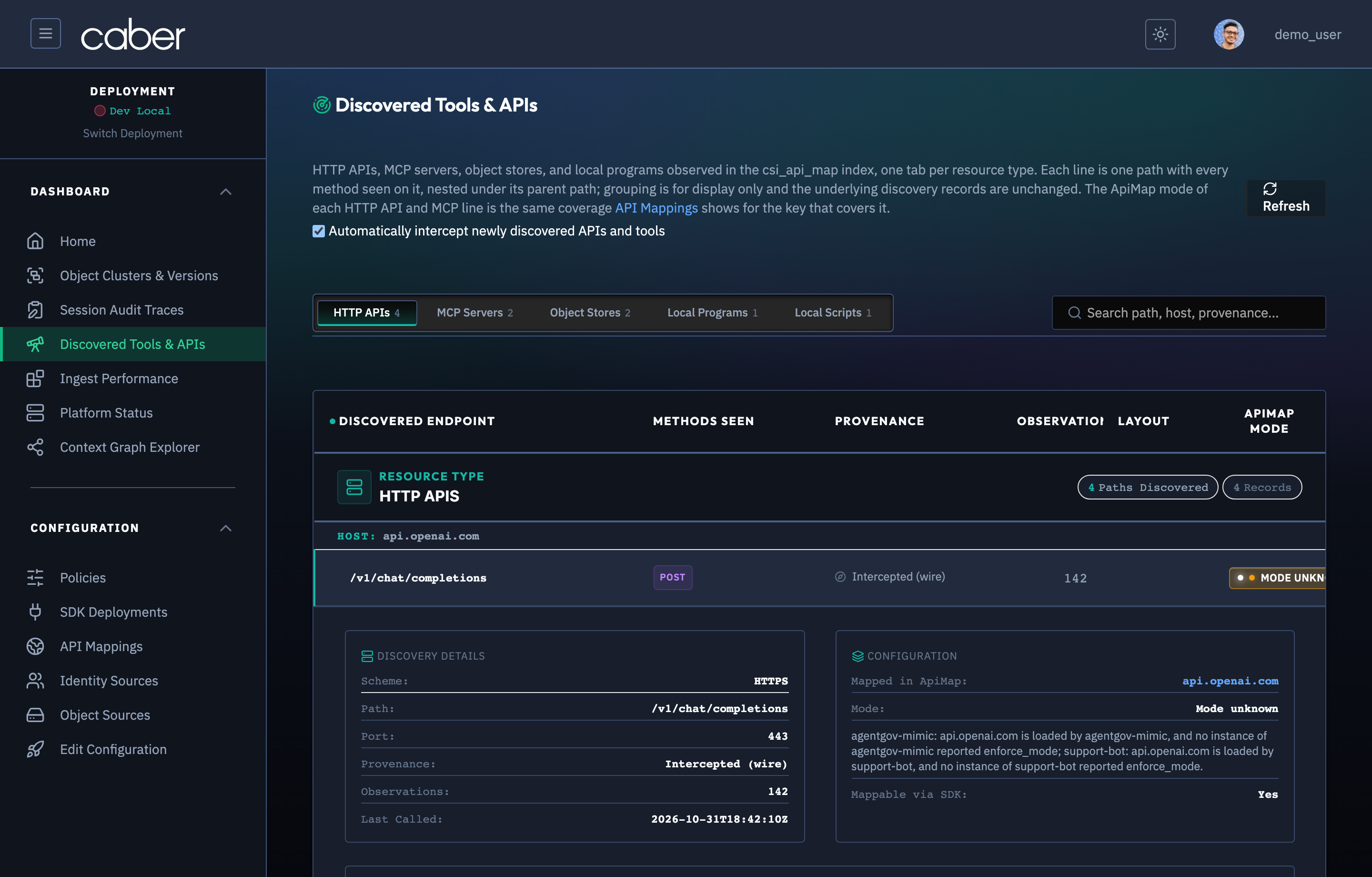
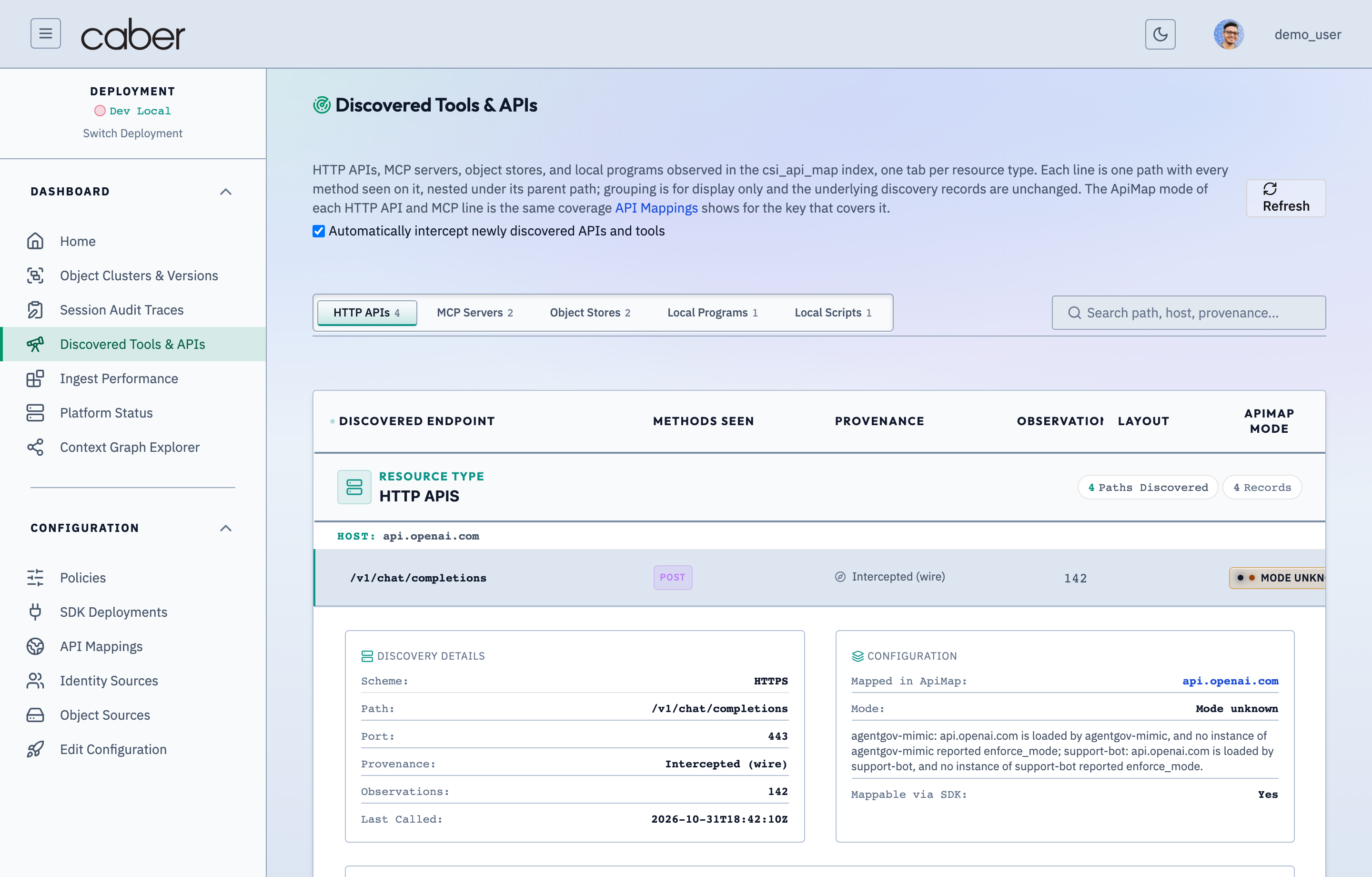
Clicking any endpoint row under a host header expands its Endpoint Detail Panel, revealing per method discovery records and mapping actions.
/admin/discoveryDiscovered Endpoint Expanded Row — Observed Payload Schema & Sample InspectorAssertion Verified: Proves that clicking any discovered endpoint row in /admin/discovery reveals the observed request/response JSON structure, inferred prompt/completion/identity paths, and one-click actions to confirm the layout or promote it to an ApiMap rule.
Observed Endpoint Details
The expanded endpoint panel displays:
- Canonical Endpoint Key: Host, port, scheme (
https), HTTP method (POST), and normalized path (/v1/chat/completions). - Discovery Channel Badges: Indicates whether traffic was captured via inline
wireinterception,passivetelemetry, or both. - Mapping Status: If the host is already present in
ApiMap, displays the bound configuration key (api.openai.com), upstream target, and a quick link to edit the mapping in/admin/config/api-mappings.
Inline + Add API Mapping Wizard
When an unmapped endpoint row (such as billing.example.com/POST/v2/invoices/query) is expanded, clicking + Add API Mapping opens an inline configuration wizard directly inside the discovery row.
/admin/discoveryAdd to API Mappings Wizard — Promoting Discovered Endpoints to Interception RulesAssertion Verified: Proves that operators can promote any discovered HTTP endpoint or MCP tool directly into a persistent ApiMap interception rule via a guided wizard without writing manual YAML or JSON.
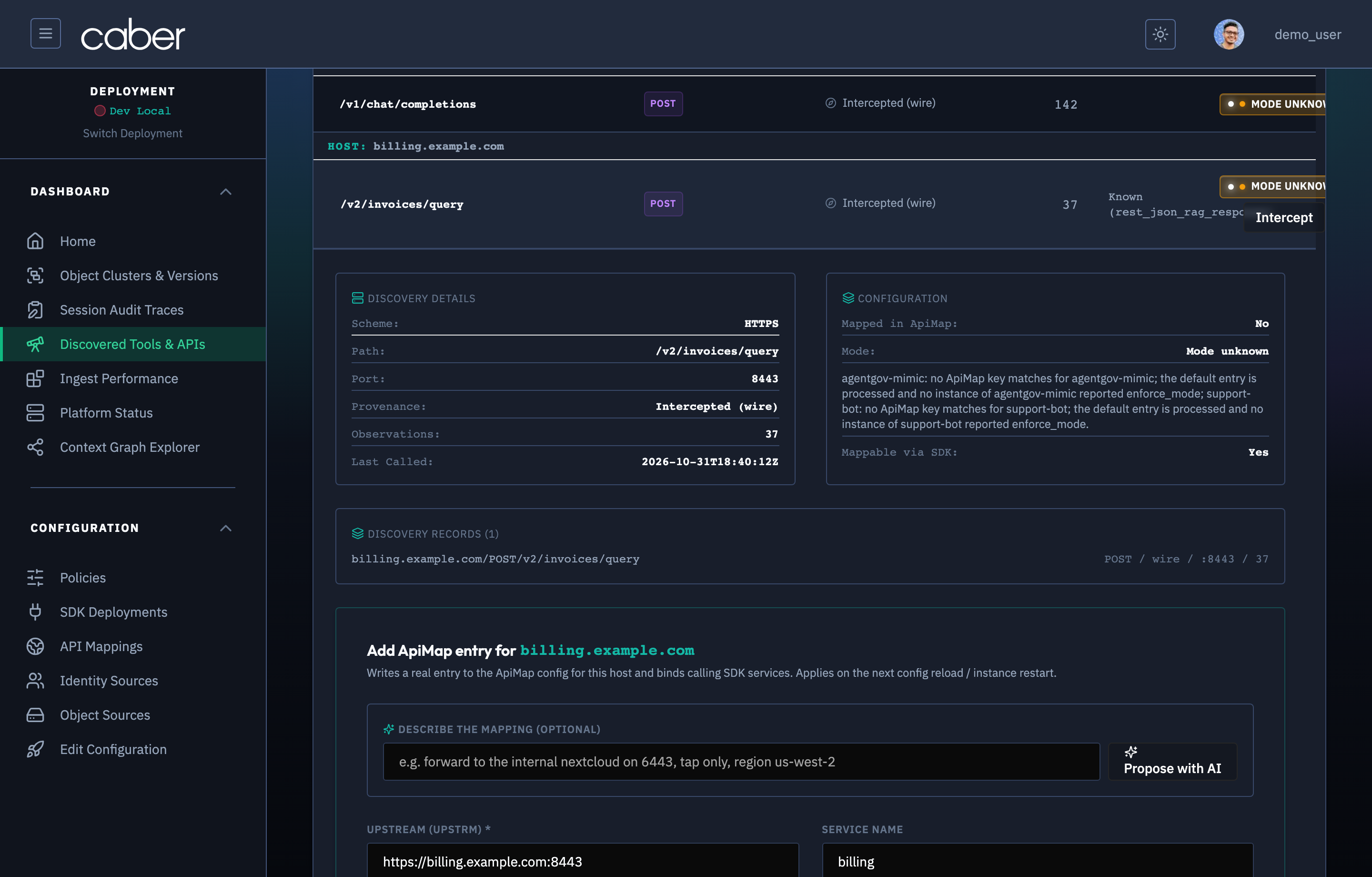
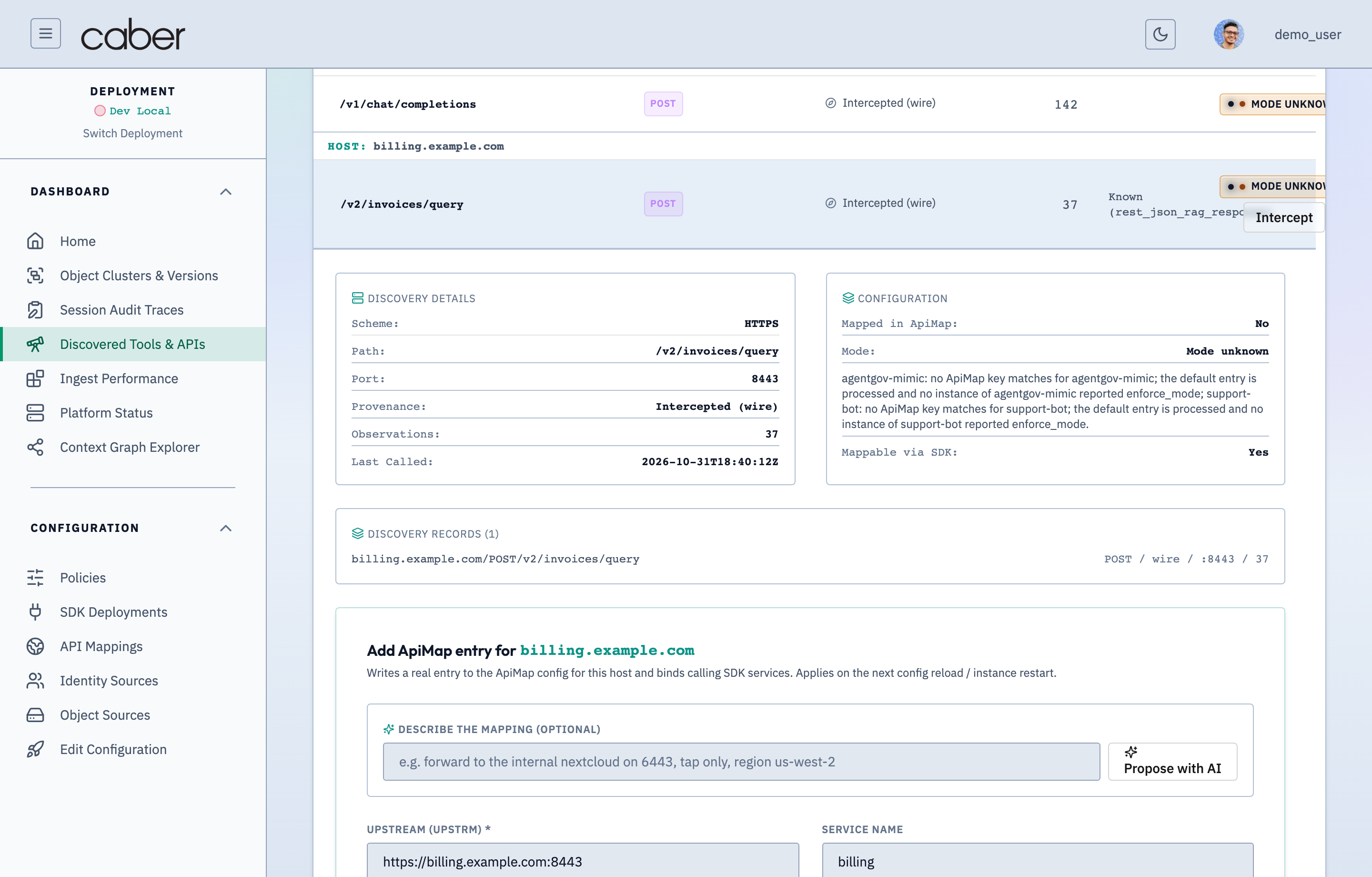
The inline wizard pre populates the host and scheme from the discovered traffic and lets the operator configure:
- Mapping Key: The
ApiMapidentifier (pre filled withbilling.example.com). - Upstream URL (
upstrm): The target origin URL (https://billing.example.com:8443). - Governance Function (
function): Whether Caber shouldgovern(evaluate policies and redact payloads) orobserve(audit only). - Enforcement Mode (
enforce_mode):enforce(active inline redaction/blocking) orobserve(shadow evaluation). - Body Format (
body_format): The wire protocol parser (rest_json,openai_chat,mcp_jsonrpc,qdrant_search).
Confirming Observed Payload Layouts (Intercept Action)
When Caber's wire observer detects structured JSON request and response bodies on an unmapped HTTP API endpoint, it computes a structural schema fingerprint (layoutLatest, such as fp-billing-v2-89a1) and displays an Intercept action button on the endpoint row.
Clicking Intercept opens the Confirm Intercept Layout panel (LayoutConfirmPanel, data-testid="layout-confirm-panel") directly below the endpoint row.
/admin/discoveryConfirm Discovered Payload Layout & Field Role Binding ModalAssertion Verified: Proves that operators can review and confirm auto-detected payload field layouts (prompt text, response content, tool arguments, and OBO principal headers/claims) before activating inline interception.
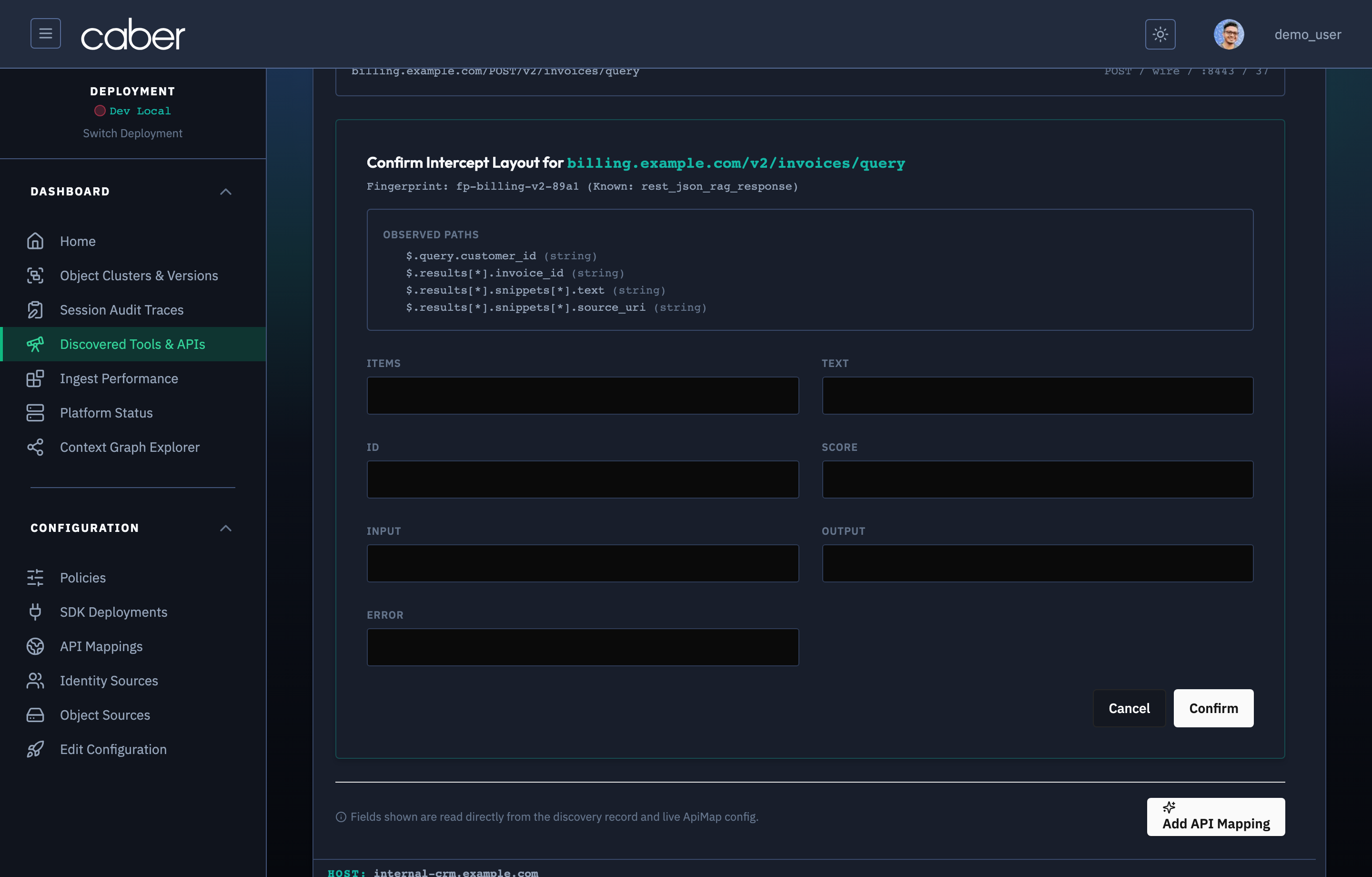
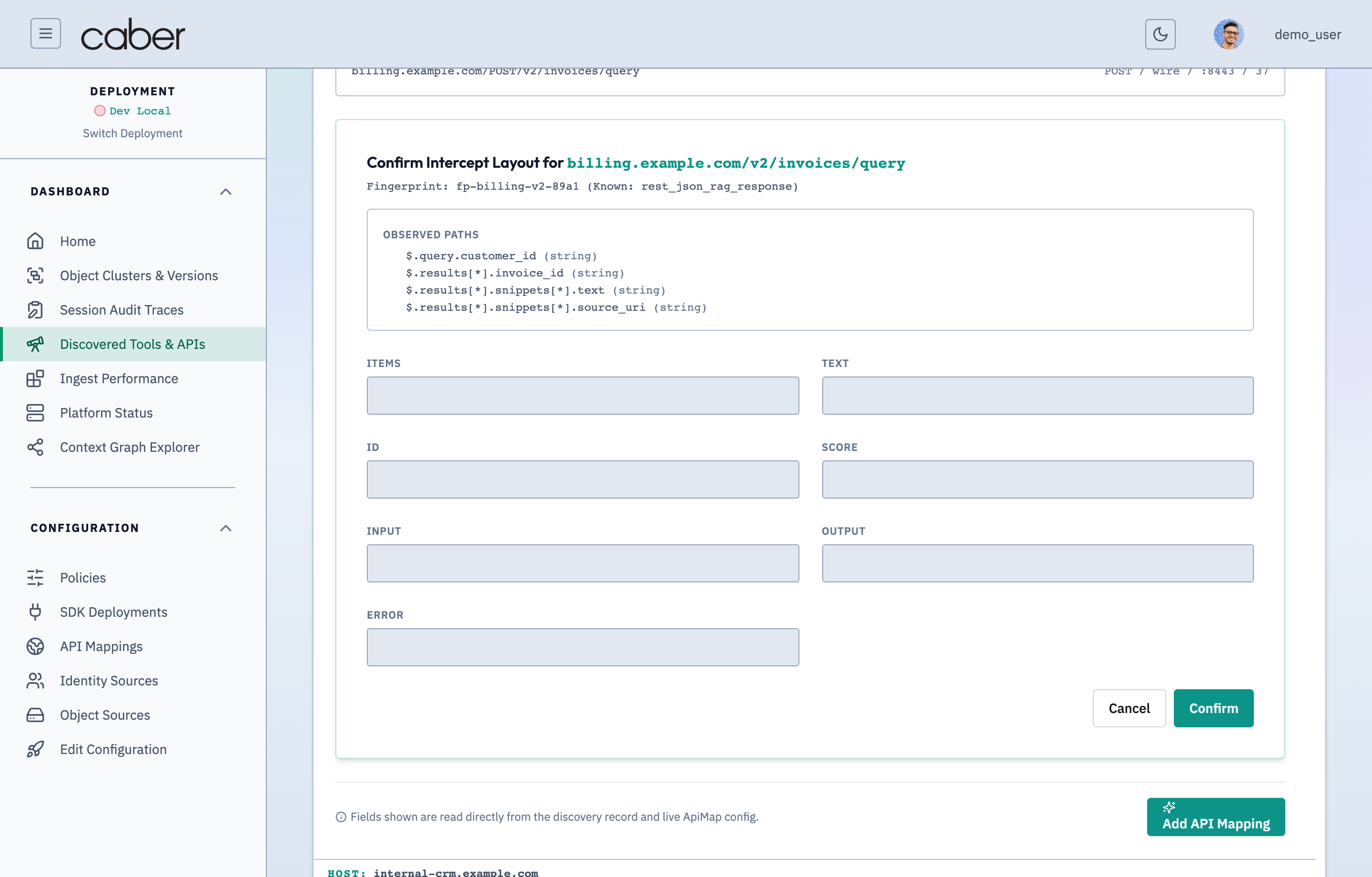
Semantic Role Binding Fields
The Confirm Intercept Layout panel bridges raw JSON wire payloads and Caber's governance engine by mapping observed JSONPaths (OBSERVED PATHS) to seven semantic roles:
| Semantic Role Field | Purpose in Governance Engine | Example Observed JSONPath |
|---|---|---|
ITEMS | Array path yielding individual retrieved context records or tool results | $.results[*] |
TEXT | Path to the textual snippet or passage inspected for n-mer overlap and surgical redaction | $.results[*].snippets[*].text |
ID | Unique document or chunk identifier used for CQF provenance and ACL lookup | $.results[*].invoice_id |
SCORE | Optional similarity or ranking score attached to each retrieved item | $.results[*].score |
INPUT | Inbound user query or tool argument path evaluated for prompt policies | $.query.customer_id |
OUTPUT | Outbound completion or response text path evaluated on response streams | $.answer.text |
ERROR | Error message path inspected to distinguish failed tool calls from valid responses | $.error.message |
Saving the Confirmed Layout
- Review Auto Detected Roles: Caber pre fills the role selectors using heuristic schema matching (
known_layout: rest_json_rag_response). - Click Observed Path Pills or Edit Paths: Clicking any pill in the OBSERVED PATHS list (
$.query.customer_id string,$.results[*].invoice_id string,$.results[*].snippets[*].text string) or typing a custom JSONPath updates the active role field. - Click
Confirm Layout: Persists the confirmed layout fingerprint and semantic role mappings to/api/discovery/{id}/confirm-layoutand registers the endpoint for inline interception.
Discovering MCP Servers & Object Stores
Switching tabs in /admin/discovery inspects non HTTP agent dependencies discovered across the deployment.
MCP Servers Tab
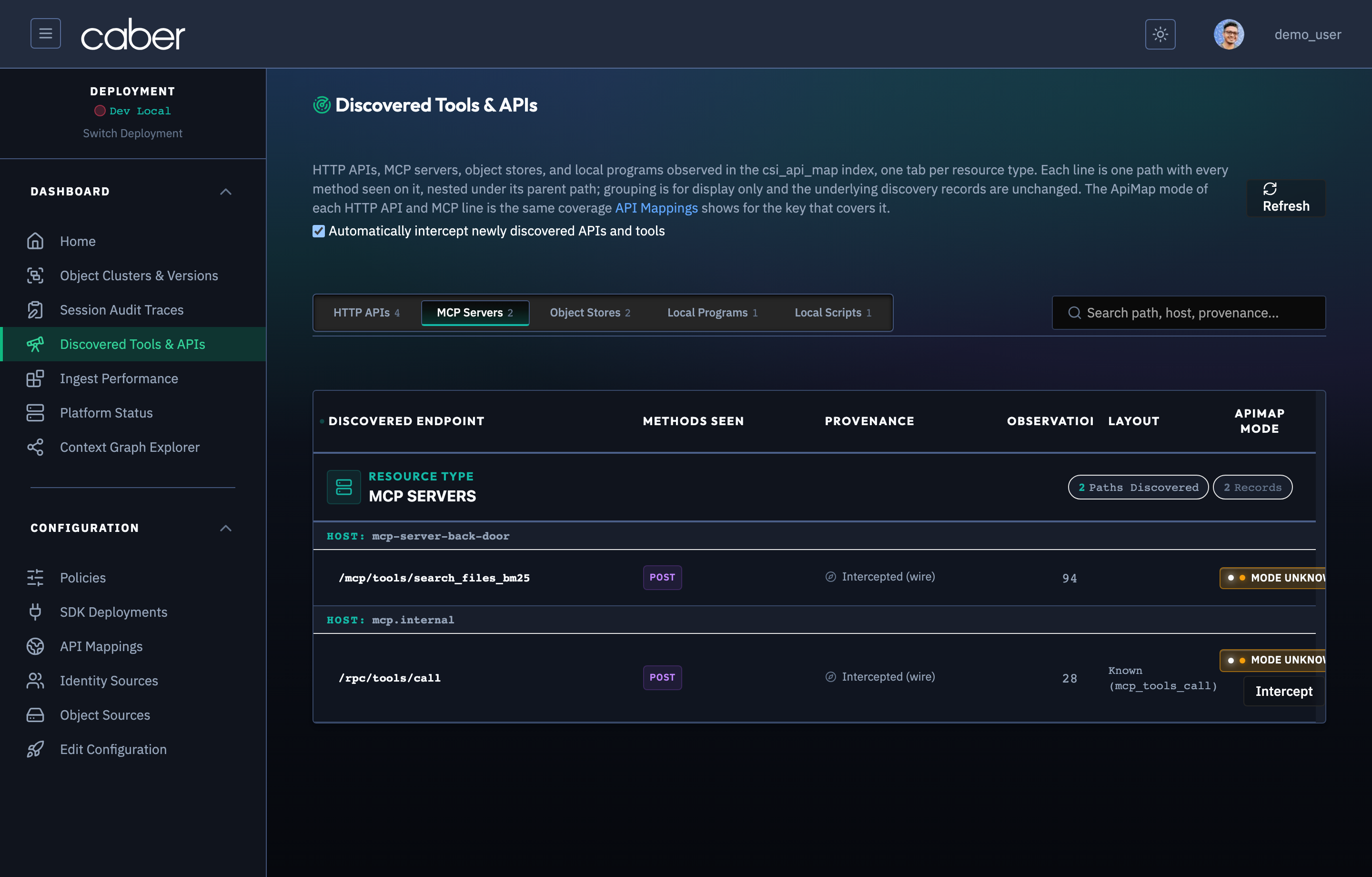
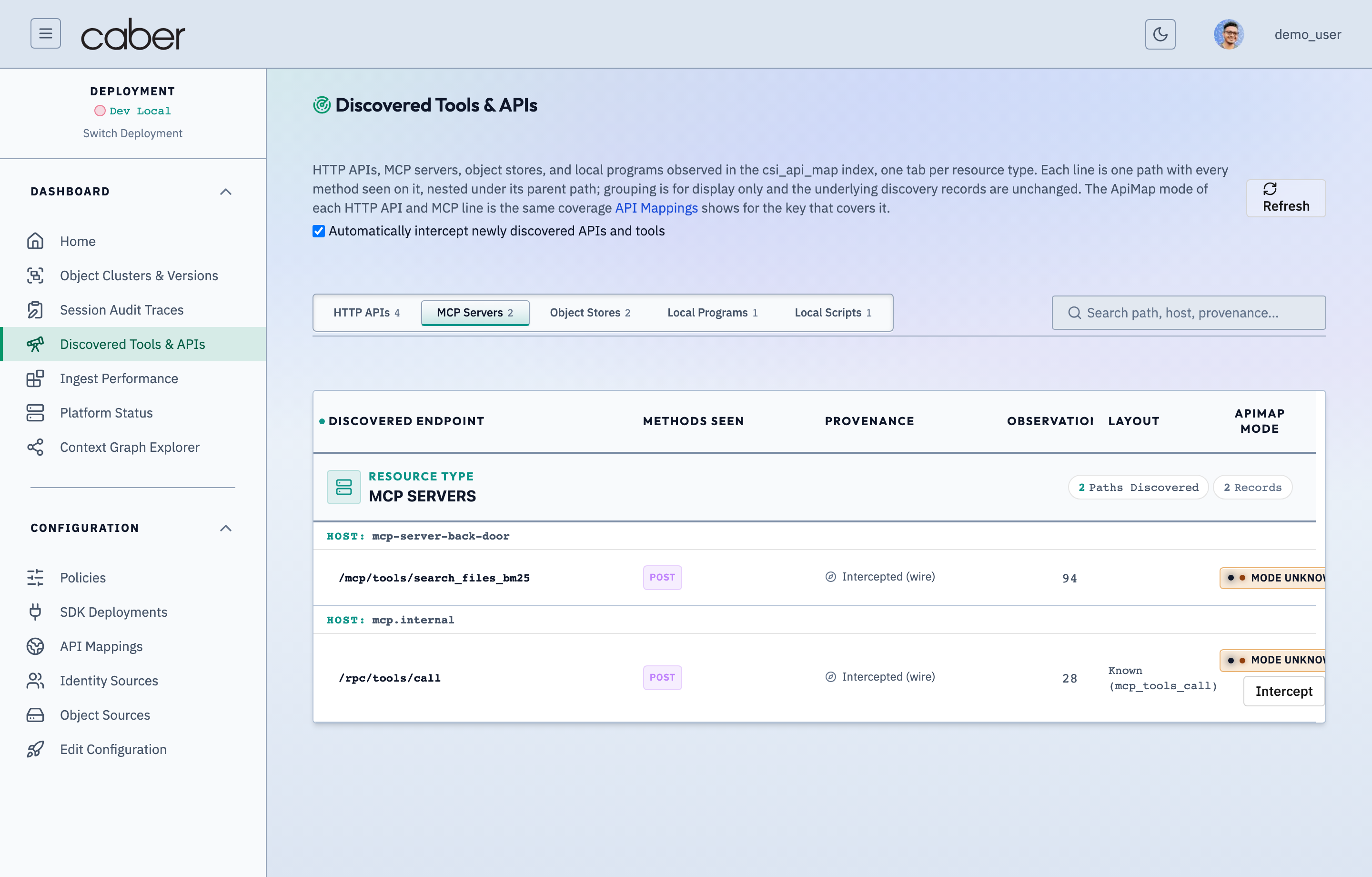
The MCP Servers tab lists discovered Model Context Protocol tool servers (mcp-server-back-door:8090), showing individual JSON RPC tool methods (tools/call/search_files_bm25, tools/call/fetch_clause_context), call volumes, and mapping status.
/admin/discoveryAPI & Tool Discovery — Model Context Protocol (MCP) Servers & Tools TabAssertion Verified: Proves that Caber discovers Model Context Protocol (MCP) servers and enumerates every exposed tool (`tools/list`, `tools/call`, `resources/read`) alongside transport type (`stdio`, `sse`, `streamable-http`) and interception status.
Object Stores Tab
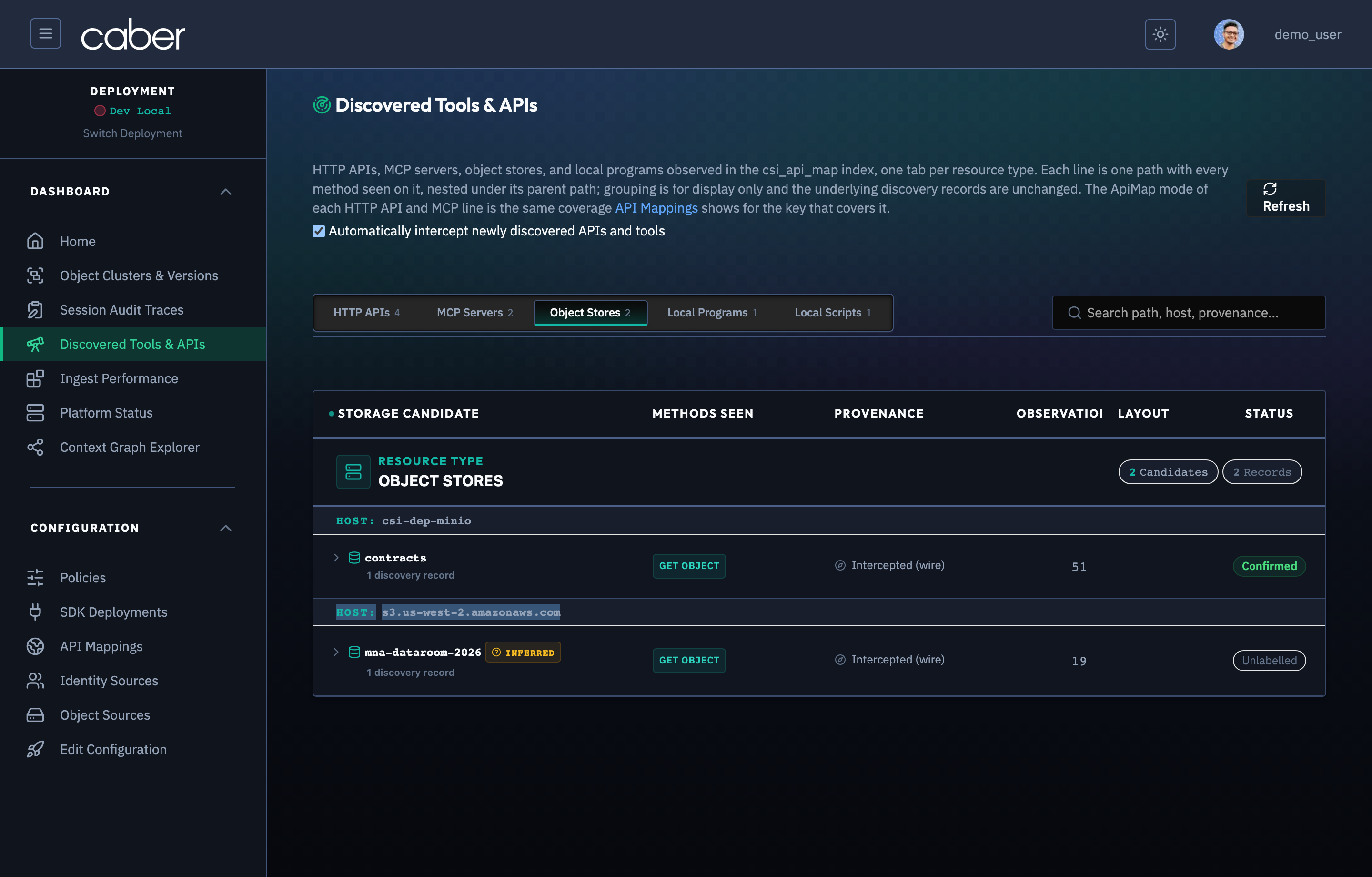
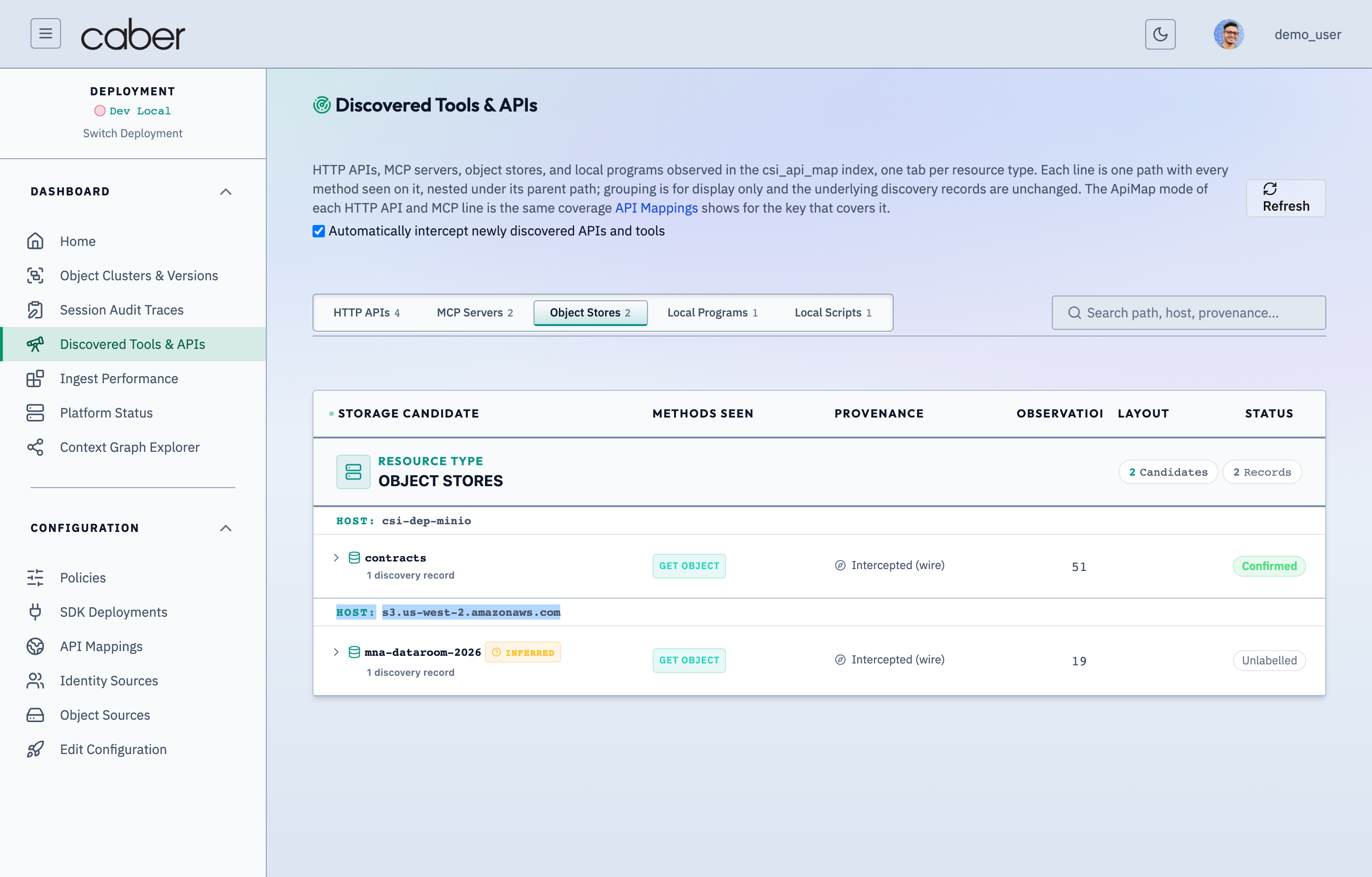
The Object Stores tab lists S3 and MinIO buckets (minio-contracts, s3-sec-filings) accessed by ingestion pipelines or agent retrieval tools, allowing operators to verify that every bucket accessed by agents is registered under Object Sources (/admin/config/object-sources).
/admin/discoveryAPI & Tool Discovery — Discovered Object Stores & Buckets TabAssertion Verified: Proves that Caber identifies S3-compatible object storage buckets accessed by workloads or available on configured endpoints and shows whether each bucket is onboarded into WRL characterization scanning.
API Mappings Studio (/admin/config/api-mappings)
Once endpoints are promoted from discovery or added manually, operators manage their full interception specification in API Mappings (/admin/config/api-mappings).
/admin/config/api-mappingsAPI Mappings Studio — Configured Interception Contracts & Extraction RulesAssertion Verified: Proves that /admin/config/api-mappings provides a centralized studio for managing all active ApiMap contracts that govern how the Caber proxy and pycaber(auto) SDK extract prompts, completions, tool payloads, and principals from wire traffic.
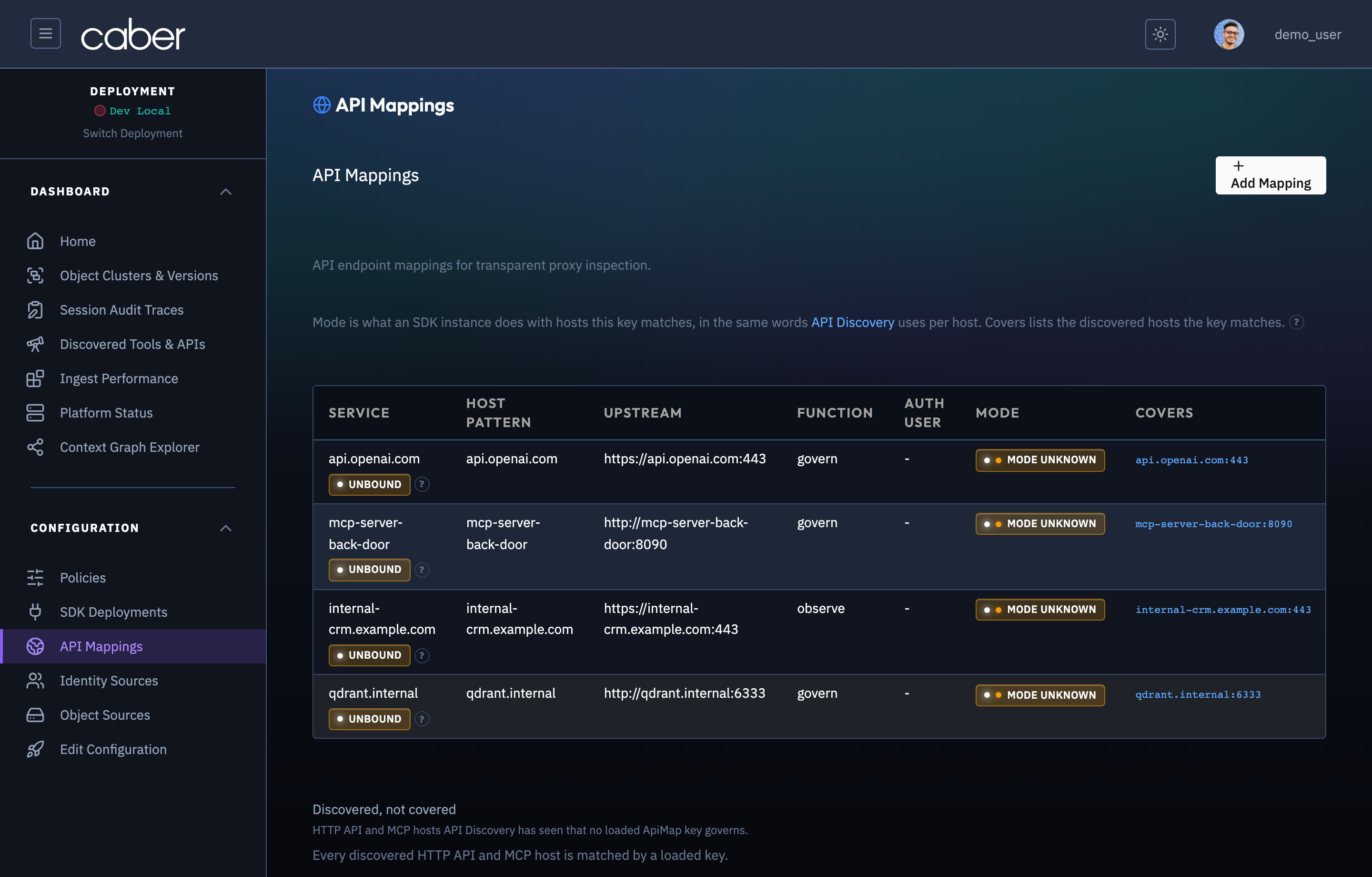
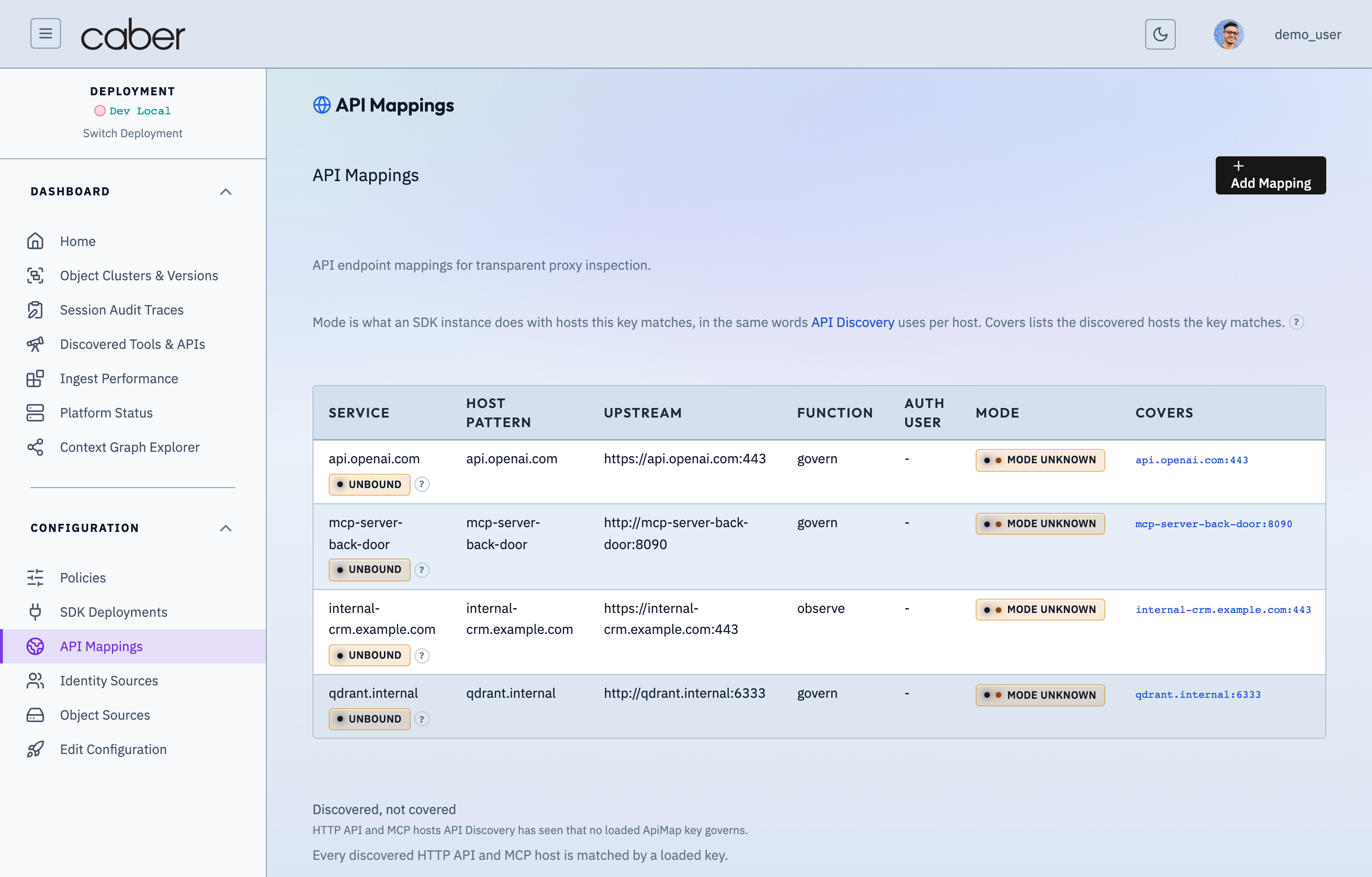
The ConfigApiMappings view displays all entries in the ApiMap section of the runtime configuration:
- Host Table Columns: Displays the
ApiMaphost key (api.openai.com,mcp-server-back-door,internal-crm.example.com,qdrant.example.com), upstream origin URL (upstrm), governance function (governvsobserve), enforcement mode (enforcevsobserve), payload parser (body_format), and configured route rule count. + Add Mapping: Opens a blank host editor drawer to define a newApiMapentry from scratch.- Row Click / Edit Action: Clicking any host row opens the API Mapping Detail Editor for that host.
Editing Route Rules & Semantic Roles in API Mappings
Opening a host in /admin/config/api-mappings displays the API Mapping Detail Editor, where operators configure host level proxy settings and per path route_rules.
/admin/config/api-mappingsAPI Mapping Rule Editor — JSONPath Extraction & Redaction Target ConfigurationAssertion Verified: Proves that operators can inspect and edit fine-grained ApiMap extraction selectors (request prompt paths, response content paths, streaming chunk selectors, and OBO identity headers) with live schema validation.
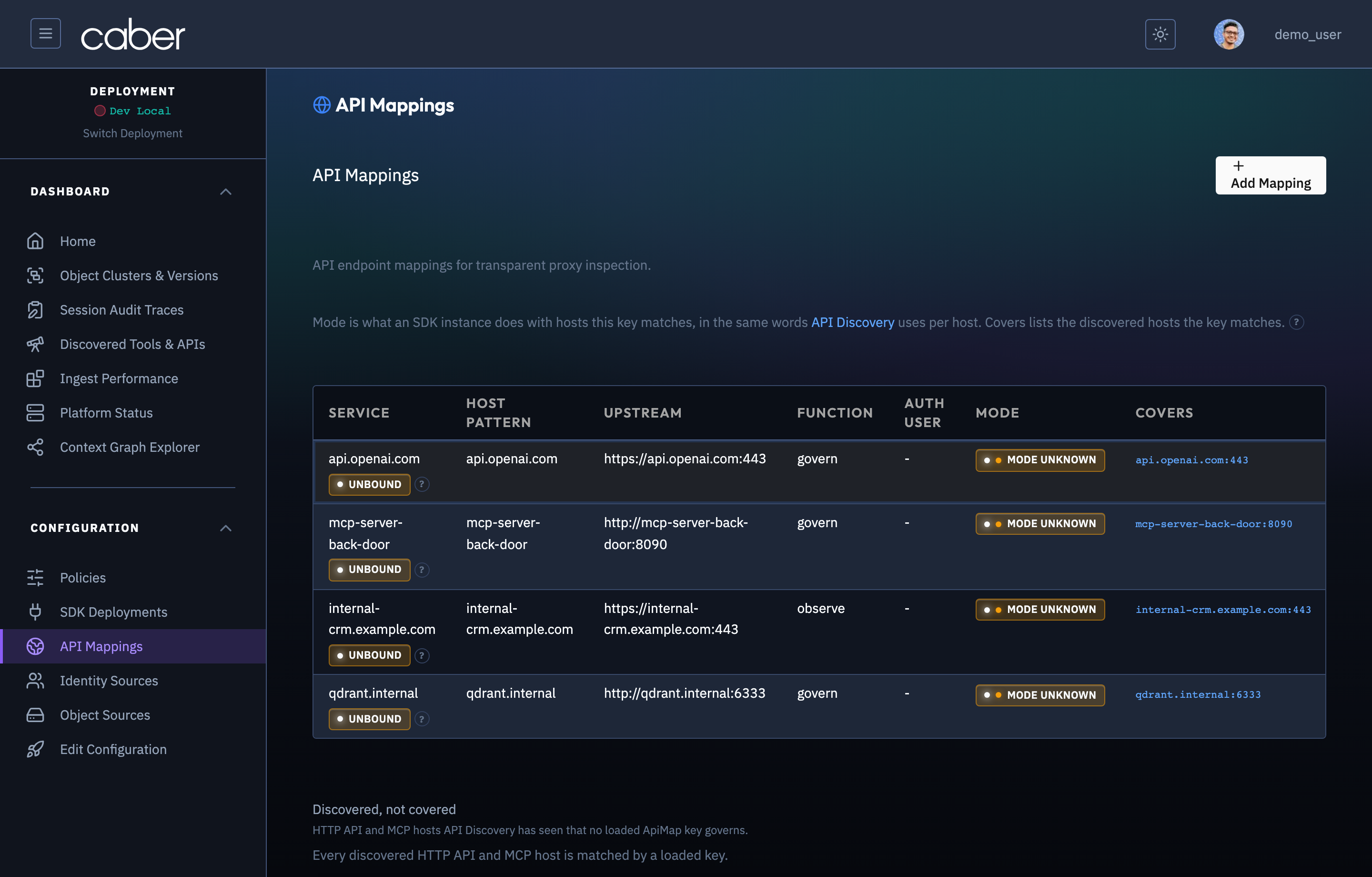
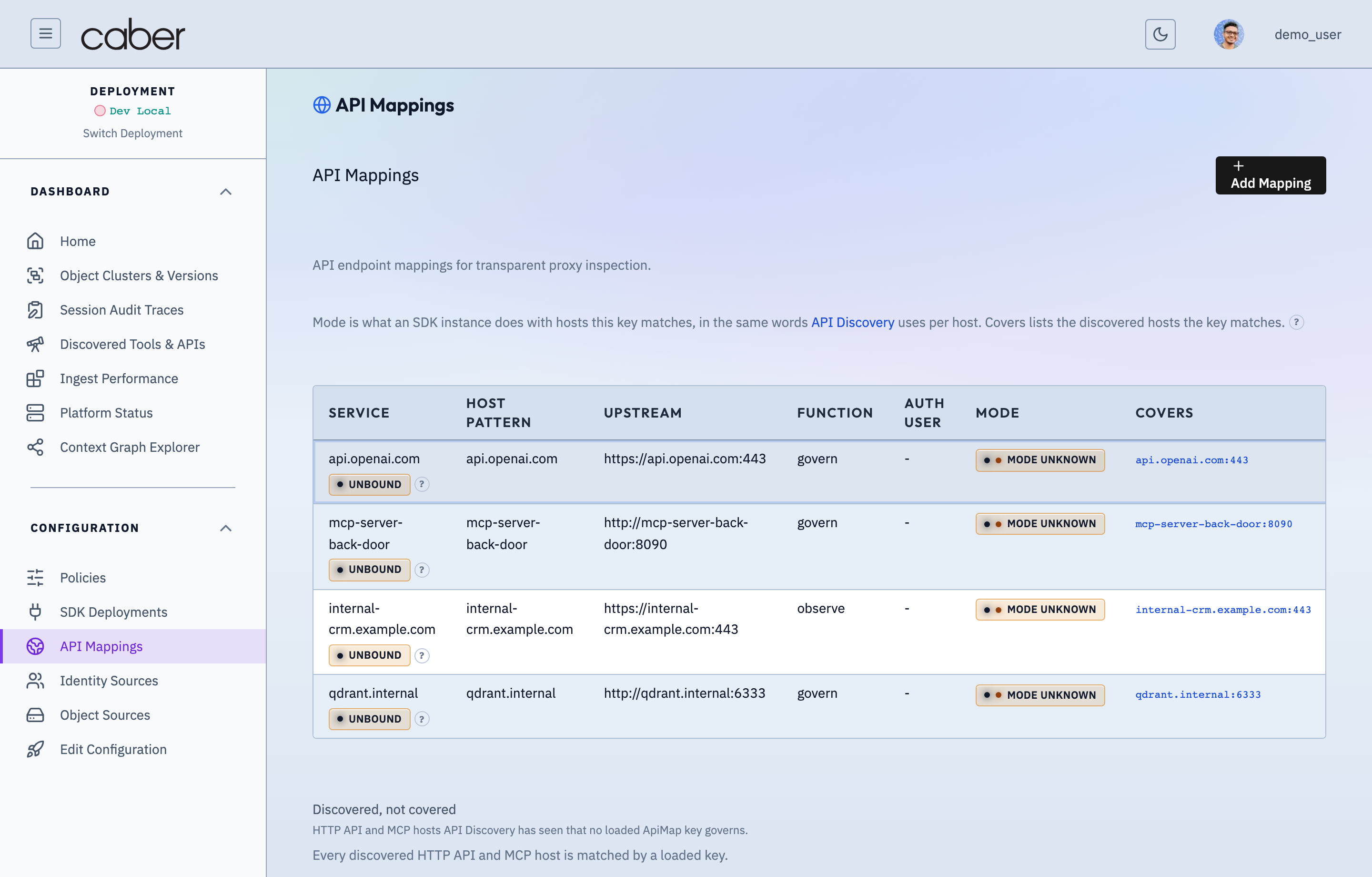
Host Level Interception Settings
- Upstream Target (
upstrm): The destination scheme, host, and port to which governed requests are forwarded (https://api.openai.com:443). - Function (
function):govern: Evaluates active policies, performs CQF freshness and ACL checks, and applies inline surgical redaction.observe: Extracts telemetry and audit traces without modifying payloads in flight.
- Enforcement Mode (
enforce_mode): Controls whether policy violations actively redact/block (enforce) or log shadow verdicts (observe). - Body Format (
body_format): Selects the protocol parser (openai_chat,anthropic_messages,mcp_jsonrpc,qdrant_search,rest_json, orgraphql).
Path Specific Route Rules (route_rules)
Each ApiMap host can define multiple route_rules entries so different endpoints on the same host are governed according to their specific schema:
path_prefix&methods: Matches requests by URL prefix (/v1/chat/completions,/mcp/tools/search_files_bm25) and HTTP verb (POST,GET).govern_request&govern_response: Independently toggles governance evaluation on the inbound request body (for example, redacting unauthorized RAG context inside an LLM prompt) and the outbound response body (for example, redacting unauthorized chunks returned by anMCPtool server before they reach the agent).semantic_roles: Binds JSONPath expressions (query,context,item_id,source_uri) to the endpoint's payload structure so Caber extracts and redacts exact text spans while keeping the surrounding JSON envelope valid.