
Document Parser SDK
Before the WRL Chunker can characterize enterprise data at 40 byte granularity, Caber must extract clean UTF8 text, structural elements, byte offset mappings, and security metadata from heterogeneous document formats. While Caber includes built in parsers for PDF, Office documents (DOCX, XLSX, PPTX), HTML/Markdown, structured JSON/CSV/Parquet, source code, and OCR via Apache Tika and IBM Docling, enterprises often have proprietary file formats, CAD/engineering schematics, medical imaging reports (DICOM/HL7), or custom financial feeds.
The Caber Document Parser SDK (pycaber_parser in Python and document_parser_container / document_parser_types in Rust) enables developers to register custom document parsers and post extraction enrichers that plug directly into the DocParser.formatRouter pipeline.
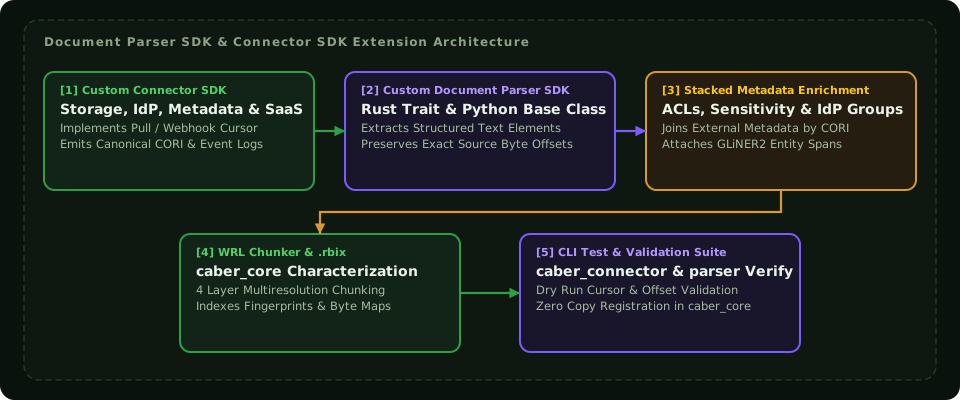
Every custom parser produces a ParsedDocument composed of DocumentElement records so that downstream 40 byte WRL Chunker matches can always be traced back to the exact page, table cell, or section of the original binary file:
| Type / Struct | Fields | Purpose |
|---|---|---|
DocumentMeta | document_sha256: str, mime_type: str | None, filename: str | None, suffix: str | Coordinator supplied document identity envelope passed to /parse. |
ElementType | Section, Paragraph, Table, Figure, Footnote, Header, Footer, ListItem, Quote, Code | Semantic structural role of an extracted block. |
DocumentElement | id: Uuid, element_type: ElementType, content: str, page_number: int | None, order: int, properties: dict, bounding_box: BoundingBox | None, parent_id: Uuid | None, children_ids: list[Uuid] | Atomic structural unit emitted by a parser. |
ParsedDocument | id: Uuid, metadata: DocumentMetadata, elements: list[DocumentElement], structure: DocumentStructure, processing_info: ProcessingInfo, references: ReferenceMap, enhanced_toc: list[EnhancedTocEntry] | Complete output passed to the WRL Chunker and shared-storage. |
EnrichmentResult | added_elements: list[DocumentElement], annotations: dict[Uuid, list[Annotation]], additional_metadata: dict[str, Any], added_relationships: list[ElementRelationship], stage_metrics: StageMetrics | Additive enrichment payload merged into ParsedDocument. |
HealthStatus | healthy: bool, message: str, details: dict[str, Any] | Readiness and liveness report emitted by GET /health. |
3. Exhaustive Python SDK Reference (pycaber_parser)
The Python SDK is the pycaber_parser module, a native PyO3 extension shipped as its own wheel (pip install pycaber-parser, then import pycaber_parser). It does not require the pycaber wheel. It provides lifecycle functions, callback registration hooks, and server supervisors.
3.1 pycaber_parser.register_parser
Registers a Python callable as the active document parser for the container. The registered callback is invoked whenever the container receives a POST /parse request.
Syntax
def register_parser(callback: Callable[[str, dict[str, Any]], dict[str, Any] | str]) -> NoneParameters
| Parameter | Type | Required | Description |
|---|---|---|---|
callback | Callable[[str, dict], dict | str] | Yes | A Python callable accepting (file_path, config) and returning a dictionary or JSON string conforming to the canonical ParseEnvelope or ParsedDocument schema. |
Return Value
None. Registers the callback globally or synchronously attaches it to the runningContainerServer.
Behavioral Guarantees & Exceptions
- May be called before or after
serve(). If called beforeserve(), the callback is queued inPENDING_PARSERand attached upon server boot. - If called while the server is active, it attaches dynamically to the live Tokio runtime.
- Raises
RuntimeErrorif invoked on an active server without a running Tokio event loop. - The callback receives:
file_path(str): Absolute filesystem path to the temporary work file containing document bytes.config(dict): Combined configuration containing coordinator suppliedcustom_options,mime_type, andfilename.
3.2 pycaber_parser.register_enricher
Registers a Python callable as the active document enricher for the container. The registered callback is invoked whenever the container receives a POST /enrich request.
Syntax
def register_enricher(callback: Callable[[str, dict[str, Any]], dict[str, Any] | str]) -> NoneParameters
| Parameter | Type | Required | Description |
|---|---|---|---|
callback | Callable[[str, dict], dict | str] | Yes | A Python callable accepting (document_json_path, config) and returning a dictionary or JSON string conforming to EnrichEnvelope or EnrichmentResult. |
Return Value
None. Registers the enricher globally or attaches it to the runningContainerServer.
Behavioral Guarantees & Exceptions
- Queued in
PENDING_ENRICHERif invoked prior toserve(). - Raises
RuntimeErrorif called while the server is running without an accessible Tokio runtime context. - Enricher output is merged into the master document using the complementary merge pattern; existing element IDs and spans are preserved while new annotations and relationships are appended.
3.3 pycaber_parser.serve
Starts the container HTTP server using Axum and Tokio multi thread runtime, binding to the designated TCP port and blocking the calling thread until a graceful termination signal (SIGINT, SIGTERM, or Ctrl+C) is caught.
Syntax
def serve(
    config: ContainerConfig | None = None,
    port: int | None = None
) -> None
Parameters
| Parameter | Type | Default | Description |
|---|---|---|---|
config | ContainerConfig | None | None | Structured container configuration object. If omitted, values are loaded from environment variables (CABER_PARSER_*). |
port | int | None | None | Shorthand override for TCP port. If specified without config, equivalent to passing ContainerConfig(port=port). |
Return Value
None. Blocks until server shutdown completes.
Behavioral Guarantees & Exceptions
- Automatically releases the Python GIL during network polling and asynchronous dispatch (
py.allow_threads). - If
manifest_pathis configured inContainerConfigorCABER_PARSER_MANIFEST_PATH, the server loads and caches the manifest JSON file before opening TCP sockets. - Raises
RuntimeErrorif Tokio runtime initialization fails or if binding the TCP socket fails (such as address already in use).
3.4 pycaber_parser.serve_worker_supervisor
Launches a multi process WorkerSupervisor backed container server. Designed for heavy machine learning and parsing workloads (such as IBM Docling or GLiNER) that require isolated worker processes to prevent Python memory fragmentation or interpreter crashes.
Syntax
def serve_worker_supervisor(
    capabilities: list[tuple[str, str]],
    config: ContainerConfig | None = None,
    port: int | None = None,
    python_path: str | None = None,
    scripts_dir: str | None = None,
    default_capability: str | None = None
) -> None
Parameters
| Parameter | Type | Default | Description |
|---|---|---|---|
capabilities | list[tuple[str, str]] | Required | List of (capability_name, runner_module) pairs (e.g. [("docling", "docling_runner"), ("gliner", "gliner_runner")]). |
config | ContainerConfig | None | None | Container configuration settings. |
port | int | None | None | Shorthand TCP port override. |
python_path | str | None | None | Path to worker Python interpreter executable. Defaults to active virtual environment executable. |
scripts_dir | str | None | None | Directory containing runner scripts. If omitted, uses embedded orchestrator scripts. |
default_capability | str | None | None | Capability invoked when incoming request omits explicit capability selection. Defaults to the first entry in capabilities. |
Return Value
None. Blocks until supervisor termination.
Behavioral Guarantees & Exceptions
- Raises
ValueErrorifcapabilitiesis empty or if no default capability can be determined. - Employs fault tolerant pool initialization (
start_tolerant). If an individual worker fails model loading (e.g. GPU out of memory), the failure reason is recorded inunavailable_capabilities. GET /healthreports the exact availability status per capability and returns HTTP 503 if the primary parse capability is unavailable.- Incoming requests targeting an unavailable capability are rejected with HTTP 503 before writing work files to disk.
3.5 pycaber_parser.ContainerConfig
Data configuration class governing container server behavior, timeouts, and resource paths.
Fields & Constructor
class ContainerConfig:
    port: int = 8081
    shutdown_timeout_seconds: int = 30
    manifest_path: str | None = None
    temp_dir: str | None = None

    def __init__(
        self,
        port: int = 8081,
        shutdown_timeout_seconds: int = 30,
        manifest_path: str | None = None,
        temp_dir: str | None = None
    ) -> None: ...
Field Specifications
| Field | Type | Default | Environment Variable | Description |
|---|---|---|---|---|
port | int | 8081 | CABER_PARSER_PORT | TCP port on which the Axum REST engine listens. |
shutdown_timeout_seconds | int | 30 | CABER_PARSER_SHUTDOWN_TIMEOUT | Maximum grace period in seconds to wait for in flight requests during shutdown. |
manifest_path | str | None | None | CABER_PARSER_MANIFEST_PATH | Path to manifest.json describing parser capabilities and requirements. |
temp_dir | str | None | None | CABER_PARSER_TEMP_DIR | Working directory for transient document disk buffers. Defaults to system temp directory. |
4. Container HTTP REST Wire Protocol Specification
The Caber Document Parser Container exposes a standardized, versioned HTTP REST interface. Every request carries schema_version which must strictly match the engine schema version ("4.2").
Protocol Summary Table
| Method | Endpoint | Request Body | Success Response | Error Codes | Description |
|---|---|---|---|---|---|
POST | /parse | ParseRequest | ParseResponse | 400, 500, 503 | Primary structural extraction endpoint. |
POST | /enrich | EnrichRequest | EnrichResponse | 400, 500, 503 | NLP and metadata enrichment endpoint. |
GET | /health | None | HealthStatus | 200, 503 | Liveness and capability readiness probe. |
GET | /manifest | None | ParserManifest | 200 | Parser declaration and resource metadata. |
4.1 Endpoint: POST /parse
Executes primary structure and text extraction on an incoming document.
Request Headers
Content-Type: application/json
Request Payload (ParseRequest)
{
  "schema_version": "4.2",
  "handle": {
    "Bytes": {
      "data": "JVBERi0xLjQKJ..."
    }
  },
  "doc": {
    "document_sha256": "e3b0c44298fc1c149afbf4c8996fb92427ae41e4649b934ca495991b7852b855",
    "mime_type": "application/pdf",
    "filename": "quarterly_financials.pdf",
    "suffix": ".pdf"
  },
  "config": {
    "extract_structure": true,
    "extract_tables": true,
    "ocr_enabled": false,
    "custom_options": {
      "capability": "docling",
      "detect_code": true
    }
  }
}
Response Payload (ParseResponse)
{
  "schema_version": "4.2",
  "document": {
    "id": "7b0a51c4-1422-4411-9e73-b3c12658cb02",
    "metadata": {
      "file_path": "quarterly_financials.pdf",
      "file_name": "quarterly_financials.pdf",
      "file_extension": "pdf",
      "mime_type": "application/pdf",
      "total_pages": 4
    },
    "elements": [
      {
        "id": "9a38f36c-946a-4d22-bf44-64b58e705b11",
        "element_type": "section",
        "content": "Consolidated Financial Statements",
        "page_number": 1,
        "order": 0,
        "properties": {
          "level": 1
        },
        "bounding_box": null,
        "parent_id": null,
        "children_ids": []
      },
      {
        "id": "18c886e2-2a54-469b-9860-75d164ad9c22",
        "element_type": "paragraph",
        "content": "Revenues for the fiscal quarter ended September 30 reached record highs.",
        "page_number": 1,
        "order": 1,
        "properties": {
          "word_count": 11,
          "bytes": 72
        },
        "bounding_box": null,
        "parent_id": null,
        "children_ids": []
      }
    ],
    "structure": {
      "section_count": 1,
      "paragraph_count": 1,
      "table_count": 0,
      "figure_count": 0,
      "footnote_count": 0,
      "total_word_count": 11,
      "total_bytes": 72
    },
    "processing_info": {
      "parser_type": "docling",
      "processing_time_ms": 142
    },
    "references": {
      "tables": {},
      "figures": {},
      "footnotes": {},
      "sections": {}
    },
    "enhanced_toc": []
  },
  "metrics": {
    "processing_time_ms": 142,
    "elements_processed": 2,
    "annotations_added": 0,
    "elements_added": 2
  }
}
Status Codes & Error Conditions
200 OK: Successful document parsing.400 Bad Request: Schema version skew (schema_version != "4.2") or invalid base64 byte handle.500 Internal Server Error: Disk write failure, memory exhaustion, or parsing worker crash.503 Service Unavailable: No parser callback registered or requested supervisor capability is unavailable.
4.2 Endpoint: POST /enrich
Applies post parsing NLP, PII classification, or entity recognition to an existing ParsedDocument.
Request Payload (EnrichRequest)
{
  "schema_version": "4.2",
  "document": { ... },
  "handle": {
    "LocalPath": {
      "path": "/var/tmp/quarterly_financials.pdf"
    }
  },
  "doc": {
    "document_sha256": "e3b0c44298fc1c149afbf4c8996fb92427ae41e4649b934ca495991b7852b855",
    "mime_type": "application/pdf",
    "filename": "quarterly_financials.pdf",
    "suffix": ".pdf"
  },
  "config": {
    "custom_options": {
      "capability": "gliner",
      "confidence_threshold": 0.85
    }
  }
}
Response Payload (EnrichResponse)
{
  "schema_version": "4.2",
  "result": {
    "added_elements": [],
    "annotations": {
      "18c886e2-2a54-469b-9860-75d164ad9c22": [
        {
          "annotation_type": "ner",
          "value": {
            "entity": "September 30",
            "label": "DATE"
          },
          "confidence": 0.98,
          "source_parser": "gliner_enricher"
        }
      ]
    },
    "additional_metadata": {
      "contains_financial_figures": true
    },
    "added_relationships": [],
    "stage_metrics": {
      "processing_time_ms": 38,
      "elements_processed": 2,
      "annotations_added": 1,
      "elements_added": 0
    }
  },
  "metrics": {
    "processing_time_ms": 38,
    "elements_processed": 2,
    "annotations_added": 1,
    "elements_added": 0
  }
}
4.3 Endpoint: GET /health
Liveness and capability readiness verification endpoint.
Response Payload (HealthStatus)
{
  "healthy": true,
  "message": "OK",
  "details": {
    "uptime_seconds": 3612,
    "parser_registered": true,
    "enricher_registered": true,
    "capabilities": {
      "docling": "ready",
      "gliner": "ready"
    }
  }
}
Unhealthy Response (HTTP 503)
{
  "healthy": false,
  "message": "primary parse capability unavailable",
  "details": {
    "uptime_seconds": 12,
    "parser_registered": false,
    "enricher_registered": true,
    "capabilities": {
      "docling": "unavailable: CUDA driver initialization failed (out of memory)"
    }
  }
}
4.4 Endpoint: GET /manifest
Returns the static capability manifest declaring supported MIME types, file formats, and resource allocations.
Response Payload (ParserManifest)
{
  "parser_type": "docling_standard_parser",
  "version": "2.5.0",
  "description": "High performance document parser for PDF, Office, and structured formats",
  "capabilities": ["StructureExtract", "Ocr"],
  "supported_formats": ["pdf", "docx", "pptx", "xlsx", "html"],
  "supported_languages": ["en", "de", "fr", "es"],
  "requires_gpu": true,
  "gpu_memory_mb": 8192,
  "min_memory_mb": 4096,
  "chain_position": "Primary",
  "produces": ["structure", "ocr_text"],
  "consumes": [],
  "python_dependencies": [
    {
      "package": "docling",
      "version_constraint": ">=2.0,<3.0",
      "optional": false
    }
  ],
  "required_config": [],
  "health_check_interval_seconds": 30
}
5. Testing a Parser Locally
pycaber_parser ships as an embedded HTTP container server library (register_parser, register_enricher, serve, serve_worker_supervisor, and ContainerConfig) rather than a standalone CLI command. To validate a custom parser locally before deploying it, run the callback in a local pycaber_parser server process and exercise the Section 4 HTTP endpoints directly:
- Start the local parser server: Register your parse callback with
pycaber_parser.register_parser(parse)and start the Axum server withpycaber_parser.serve(port=8081)(Sections 3.1 and 3.3):
import uuid
import pycaber_parser

def parse(file_path: str, config: dict) -> dict:
    with open(file_path, "rb") as f:
        raw_bytes = f.read()
    text = raw_bytes.decode("utf-8", errors="replace")
    return {
        "id": str(uuid.uuid4()),
        "metadata": {
            "file_path": file_path,
            "file_name": config.get("filename", "sample.txt"),
            "file_extension": "txt",
            "mime_type": config.get("mime_type", "text/plain"),
            "total_pages": 1,
        },
        "elements": [
            {
                "id": str(uuid.uuid4()),
                "element_type": "paragraph",
                "content": text,
                "page_number": 1,
                "order": 0,
                "properties": {"bytes": len(raw_bytes)},
                "bounding_box": None,
                "parent_id": None,
                "children_ids": [],
            }
        ],
        "structure": {
            "section_count": 0,
            "paragraph_count": 1,
            "table_count": 0,
            "figure_count": 0,
            "footnote_count": 0,
            "total_word_count": len(text.split()),
            "total_bytes": len(raw_bytes),
        },
        "processing_info": {"parser_type": "custom_local_parser", "processing_time_ms": 1},
        "references": {"tables": {}, "figures": {}, "footnotes": {}, "sections": {}},
        "enhanced_toc": [],
    }

pycaber_parser.register_parser(parse)
pycaber_parser.serve(port=8081)- Verify liveness and manifest: Probe
GET /healthandGET /manifest(Sections 4.3 and 4.4) to confirm thatparser_registeredistrueand that capability metadata loads cleanly:
curl -s http://127.0.0.1:8081/health | jq .
curl -s http://127.0.0.1:8081/manifest | jq .- Send a
POST /parsetest request: Submit a sample document using aParseRequestpayload (schema_versionset to"4.2", Section 4.1) and inspect the returnedParsedDocumentelements and byte counts:
curl -s -X POST http://127.0.0.1:8081/parse \
  -H "Content-Type: application/json" \
  -d '{
    "schema_version": "4.2",
    "handle": {"Bytes": {"data": "UmV2ZW51ZXMgZm9yIHRoZSBmaXNjYWwgcXVhcnRlciByZWFjaGVkIHJlY29yZCBoaWdocy4="}},
    "doc": {
      "document_sha256": "e3b0c44298fc1c149afbf4c8996fb92427ae41e4649b934ca495991b7852b855",
      "mime_type": "text/plain",
      "filename": "sample_note.txt",
      "suffix": ".txt"
    },
    "config": {
      "extract_structure": true,
      "extract_tables": false,
      "ocr_enabled": false,
      "custom_options": {}
    }
  }' | jq .
7. Registering Custom Parsers in DocParser.formatRouter
Configure DocParser.formatRouter and DocParser.pluginModules in your deployment configuration (CSI_CONFIG_FILE) so Caber routes matching extensions or MIME types to your custom parser:
{
  "DocParser": {
    "defaultBackend": "docling",
    "fallbackBackend": "tika",
    "preserveByteOffsets": true,
    "pluginModules": [
      "my_org_parsers.hl7_clinical",
      "my_org_parsers.export_control"
    ],
    "formatRouter": {
      ".hl7": "hl7_clinical_parser",
      ".cadspec": "custom_cad_spec_parser",
      ".pdf": "docling",
      ".docx": "docling",
      ".pptx": "docling",
      ".html": "native_html",
      ".md": "native_markdown"
    }
  }
}